
Pocket Piano
SYNTHJOY GAMESMusic
4.6202.00 Reviews
- Version
- 0.6.25
- Installs
- 10.00M
- Age Rating
- Teen
Screenshots
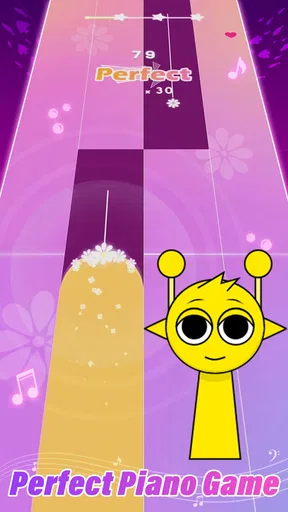
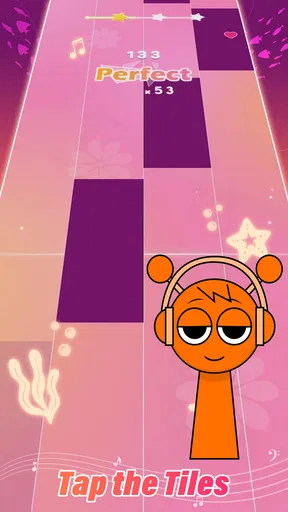
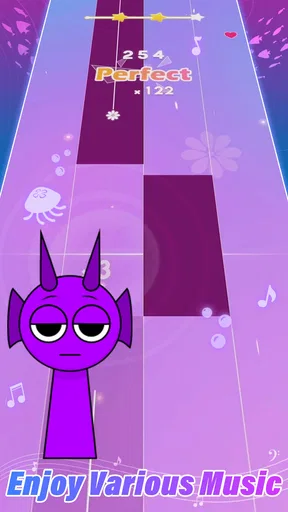
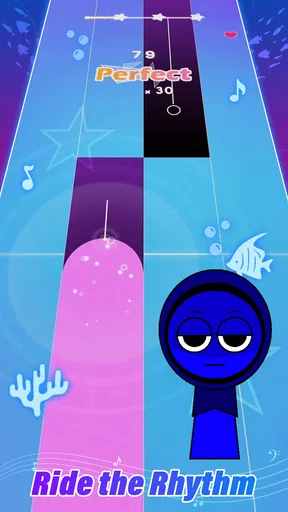
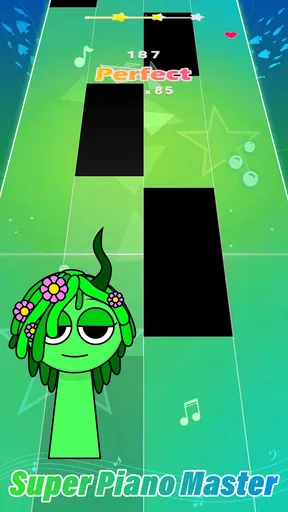
Our Review of Pocket Piano
 Analysis by Appyee
I came away from Pocket Piano with a simple impression: it is a quick-reaction music game that is much better at creating short bursts of rhythm than at replacing a real piano-learning app. That distinction matters. The game turns a phone screen into a compact piano-style challenge, asking me to tap the right tiles while familiar musical styles provide the energy. It is easy to start, free to download, and particularly suited to those moments when I want something musical to play without committing to a long session.
Developed by SYNTHJOY GAMES, this music game focuses on K-pop, phonk, EDM, and pop-oriented play. Its appeal is not technical piano practice in the traditional sense. Instead, it is about timing, concentration, and the satisfying feeling of keeping up with a moving pattern. I found it most enjoyable when I treated each round as a reflex challenge rather than expecting a full instrument simulator.
How the pocket-sized piano challenge feels in everyday use
The first thing that works in Pocket Piano is the low barrier to entry. The basic idea is immediately understandable: watch the piano-style tiles and tap them in time. There is no need to study musical notation before playing, and I did not need a quiet room, a physical keyboard, or a long tutorial to understand the central loop. That makes it a natural choice for a short break, a commute, or a few minutes before bed.
The music selection also gives the game a clear personality. K-pop and pop bring a familiar, catchy feel, while phonk and EDM make the faster moments feel more urgent. Those styles are not just background decoration; they change how I approach a session. A slower, recognizable track encourages me to settle into a rhythm, whereas a more forceful electronic track makes the same tapping mechanic feel like a test of attention.
I would not describe the experience as playing a piano in the same way I would play a keyboard instrument. The game does not ask me to choose chords, shape a melody freely, or develop finger independence in a conventional musical sense. Its piano identity is visual and rhythmic. That is a strength for casual players because it keeps the controls approachable, but it is also the main reason serious learners may find it limited.
One useful way to play is to begin with a relaxed session rather than immediately chasing flawless runs. I found that looking slightly ahead on the screen worked better than staring at the tile under my finger. The game rewards anticipation, and that habit makes a noticeable difference when patterns become denser. It also reduces the temptation to tap reactively at the last possible instant, which is where small mistakes tend to multiply.
Another practical tip is to use the game as a concentration reset. Instead of opening it with the expectation of playing for a long time, I would choose a song, focus completely on the pattern, and stop after a few attempts. That approach makes the short format feel intentional. It is especially useful when I want an activity that occupies my hands and ears without requiring the planning involved in a larger rhythm game.
The strongest part is the connection between sound and movement
What kept me returning was the way the visual action and the music reinforce each other. Even when I missed a tile, I could usually understand why: I had lost the beat, looked away, or let the pattern move faster than my attention. That clarity is important in a reflex game. A failure feels connected to my timing rather than completely random, so trying again feels worthwhile.
The best sessions happen when I stop thinking about individual taps and start following the musical pulse. This is one of the game’s more interesting qualities. It can gently encourage active listening, even though it is not teaching formal rhythm theory. I began noticing repeated phrases and anticipating transitions, which made successful runs feel more like following a song than simply touching a sequence of buttons.
That also creates a small but meaningful trade-off. Familiar songs can make the game more inviting, but familiarity may tempt me to listen passively instead of watching carefully. In practice, I had to balance the two: use the beat as a guide, but rely on the screen for exact timing. Players who assume they can play from memory alone may be surprised by how quickly a visual pattern demands full attention.
The game is also a good fit for one-handed or very casual mobile play, although the exact comfort depends on the device and how quickly the tiles arrive. On a smaller screen, the interface can feel more compact and immediate. On a larger phone, the visual field may be easier to read, but reaching across the screen can change how comfortable a long session feels. I preferred short attempts because the repeated tapping can become tiring when I play too aggressively.
Offline play changes when and where it is useful
A particularly practical feature is the ability to play offline. That makes Pocket Piano more flexible than many music-focused games that depend on a constant connection. I could use it in places where mobile data is unreliable or where I simply wanted to keep the phone in a low-distraction state. It is a good companion for a flight, a waiting room, or a train journey, provided the relevant game content is already available in the way the app expects.
Offline access also changes the role of the game in a daily routine. I would not need to reserve it for home Wi-Fi or worry about opening it only when the connection is strong. For me, that makes it easier to treat it as a pocket activity rather than another online service. The trade-off is that players who expect constantly changing social features, live competition, or a large connected ecosystem may find the experience more self-contained.
A realistic use case is a ten-minute break between tasks. I can play one or two attempts, listen closely to a familiar style, and return to work with my attention reset. It is not a productivity tool, and I would not pretend that every session is calming; fast tracks can be intense. Still, the focused tapping is more engaging than passively scrolling and less demanding than starting a full console or PC game.
Where the free model deserves a closer look
Pocket Piano is free to play, which is a major reason it is easy to recommend as a trial. At the same time, in-app purchases range from $0.99 to $29.99 per item. That range means I would advise checking the purchase flow carefully before treating the game as a completely cost-free experience. A free download can be enough for casual use, but players who want to unlock or access more of the experience may encounter optional spending.
This is not automatically a flaw. Music games often need a way to support continued development, and some players are happy to pay for convenience or extra content. My concern is more practical: the value depends on how often I play and how much of the available material I actually use. If I only open the game during occasional breaks, paying for a large bundle would be difficult to justify. If I return regularly and the available music matches my taste, a smaller purchase may feel more reasonable.
I also recommend setting a personal spending limit before playing. That is a useful habit with any free game that includes paid items, especially when the core loop encourages “one more attempt.” A near-success can make additional purchases feel more tempting, even though the purchase will not replace practice or improve basic timing. The game is most enjoyable for me when I judge progress by better concentration rather than by how much content I have bought.
What the rating and audience profile suggest
The game has an average rating of 4.5 from around 16 thousand ratings, and it has passed 10 million installs. Those figures suggest that the simple rhythm formula has reached a broad mobile audience. They do not guarantee that every player will enjoy it, but they fit my experience of a game that is easy to understand and rewarding in short sessions.
Its content rating is Teen, so I would not present it as a specifically child-focused music toy. Parents should consider that age guidance alongside the presence of in-app purchases. For teenagers and adults who enjoy pop-driven rhythm challenges, the rating feels more consistent with the game’s presentation and the intensity that can come from rapid tapping.
The game was released on April 25, 2024, and the current version is 0.6.19. It supports devices running Android 7.1 or later. In practical terms, that makes it accessible to many older Android phones, although compatibility on paper does not guarantee identical comfort on every screen. A device with responsive touch input will matter more to my enjoyment than raw specifications, because a rhythm game is unforgiving when taps register late or inconsistently.
One of the less obvious considerations is that performance and perception are connected. If the phone is struggling, the problem is not merely cosmetic: even a small delay can make a successful pattern feel impossible. I would test a short session before deciding that my timing is poor. If the controls feel responsive and the music stays synchronized, the game becomes much more enjoyable; if they do not, no amount of enthusiasm for K-pop or EDM will fully solve the issue.
Who will enjoy it, and who should choose something else
I think Pocket Piano is best for players who want a recognizable music atmosphere with simple controls and quick sessions. It suits someone who enjoys rhythm games but does not want to learn a complicated control scheme. It is also a sensible choice for people who value offline play and want a game that can fit into spare minutes rather than demanding a long campaign.
It may be especially appealing to listeners who already enjoy the featured styles. Familiar musical energy can make repeated attempts feel less repetitive, and the game’s visual piano theme gives those tracks a more active role than they would have in a normal playlist. If I already like K-pop, phonk, EDM, or pop, I am more likely to forgive the occasional restart because the music keeps the challenge inviting.
I would skip it if my main goal is to learn piano technique. A dedicated piano-learning app, virtual keyboard, or real instrument would be a better option for scales, chords, reading music, and expressive control. Pocket Piano can support a sense of timing, but it should not be mistaken for structured musical education. The distinction is important for beginners who might otherwise expect their tapping progress to transfer directly to playing songs on a keyboard.
I would also look elsewhere if I want deep customization, a large competitive community, or a story-driven game. Pocket Piano’s appeal is concentrated in its immediate rhythm loop. A more elaborate rhythm title may offer more modes and progression systems, while a music-learning alternative may provide more meaningful long-term skill development. Choosing this game makes sense when simplicity is the feature, not when simplicity feels like a missing layer.
Small habits that make the tapping more satisfying
I found three habits particularly helpful. First, I keep my finger close to the active area instead of lifting it high after every tap. That reduces unnecessary movement and makes fast sequences feel less frantic. Second, I listen for the recurring pulse while watching the next tile, using sound to prepare rather than waiting for each tile to become an emergency. Third, I treat a failed run as information: was I early, late, distracted, or simply moving too quickly?
These habits do not turn the game into a piano lesson, but they make the challenge more consistent. They also reveal one of its quiet strengths: Pocket Piano can reward deliberate practice without presenting itself as a formal training app. A player who spends a few attempts focusing on one specific weakness may improve more than someone who repeatedly taps at maximum speed and blames the game for every miss.
There is a trade-off between accuracy and excitement. Playing cautiously can help me understand a pattern, but playing too carefully may make the music feel less energetic. Once I know a section, I prefer to loosen up and let the rhythm carry the movement. That is when the game feels most musical. The goal is not merely to survive the sequence; it is to reach the point where attention and timing work together naturally.
My final recommendation after spending time with it
Pocket Piano succeeds because it keeps its central promise focused: tap along to popular musical styles in a compact piano-themed game, with the convenience of offline play. I enjoyed it most as a short, repeatable challenge that gives my attention somewhere specific to go. The combination of accessible controls, energetic genres, and quick restarts makes it easy to pick up without preparation.
Its limitations are equally clear. It is not a replacement for learning an instrument, and the free model deserves attention because optional purchases can reach from $0.99 to $29.99 per item. Players who want extensive depth, social competition, or detailed musical instruction may outgrow it. The Teen rating and purchase options also make it worth approaching thoughtfully rather than handing it over as an unrestricted children’s activity.
For me, the strongest recommendation goes to casual rhythm-game fans, pop listeners, and anyone looking for an offline distraction that can fit into a few spare minutes. I would download it freely, play several sessions, and decide based on how responsive the controls feel on my phone and how much I enjoy the available music. If you want a lively timing challenge rather than a serious piano tutor, this is a worthwhile choice.
My verdict is positive but specific: Pocket Piano is a focused mobile music game, not an all-purpose piano app. Its best qualities are immediacy, musical atmosphere, and convenience; its main weakness is that the same simplicity that makes it approachable may leave experienced players wanting more depth. For the right audience, that simplicity is exactly the point, and I would recommend giving it a try before spending anything.
Privacy and Permissions
See what permissions an app requests and how it handles your data.
- Wi-Fi connection information
- view Wi-Fi connections
- Other
- view network connections, full network access, run at startup, control vibration, prevent device from sleeping, Google Play license check
Verdict
Strengths of Pocket Piano
- Realistic piano sounds make practice and casual playing enjoyable.
- Simple interface is easy for beginners to understand.
- Works well for quick practice sessions anywhere.
- Useful for learning note positions and basic melodies.
- Lightweight design should run smoothly on many devices.
Limitations of Pocket Piano
- Small keys can feel cramped on phones, especially for larger hands.
- Advanced players may find the available sounds and features limited.
- Touchscreen response may not match the feel of a real keyboard.
- Ads or in-app purchases may interrupt the playing experience.
- Extended use can drain the battery and require frequent screen interaction.
Other Releases by SYNTHJOY GAMES
View All
Sprunki: Funky Remix Beats
Music3.5
Similar Picks in This Category
View All
Tiles Hop Music & Ball Game
AMANOTES PTE. LTD.4.3

Magic Tiles 3™ - Piano Game
AMANOTES PTE. LTD.4.6

Real Piano
Bilkon3.7

Piano Game: Classic Music Song
Dream Tiles Piano Game Studio4.0

Smash Colors: Music Ball Rush
BADSNOWBALL HONGKONG LIMITED4.2

Piano Music Go-EDM Piano Games
Joy Journey Music Games4.5
Frequently Asked Questions
What is Pocket Piano, and what can I do with it?
Pocket Piano is a portable virtual piano app designed for playing music directly on a smartphone or tablet. It typically provides an on-screen keyboard with piano sounds, allowing you to practice melodies, experiment with chords, and play simple songs wherever you are. It is useful for beginners, casual players, songwriting ideas, and anyone who wants quick access to a piano without carrying a physical instrument.
Is Pocket Piano suitable for beginners who have never played piano before?
Yes, Pocket Piano can be a convenient starting point for beginners because the notes are displayed on the screen and the interface is generally easier to understand than a full-sized keyboard. New users can practice note positions, basic scales, chords, and simple melodies at their own pace. However, the small touch-screen keys may require patience, especially when learning two-handed pieces or more advanced techniques.
Does Pocket Piano work without an internet connection?
Pocket Piano is generally intended to provide piano access on the go, and basic keyboard playing may work without a continuous internet connection once the app has been installed. Offline availability can depend on the version, device, and any online features included by the developer. It is a good idea to open the app before traveling and test the main piano functions with Wi-Fi and mobile data disabled.
Can I use Pocket Piano to learn complete songs or record my own music?
Pocket Piano can help you practice melodies, chords, and song ideas, but its learning and recording features may vary depending on the version available on your device. Some releases may focus mainly on playing the virtual keyboard rather than offering structured lessons, sheet music, or a full multitrack recorder. Before downloading, check the current app description to confirm whether recording, playback, tutorials, or song libraries are included.
Does Pocket Piano require any special equipment or offer realistic piano sound?
No special equipment is normally required because Pocket Piano uses your device’s touchscreen and built-in audio output. Headphones or external speakers can improve the listening experience, particularly in noisy environments. The sound can be useful for practice and casual playing, although a mobile app cannot completely reproduce the touch, dynamics, and acoustic resonance of a real piano. Performance may also depend on your device’s audio latency and processing power.
Play our best games!


